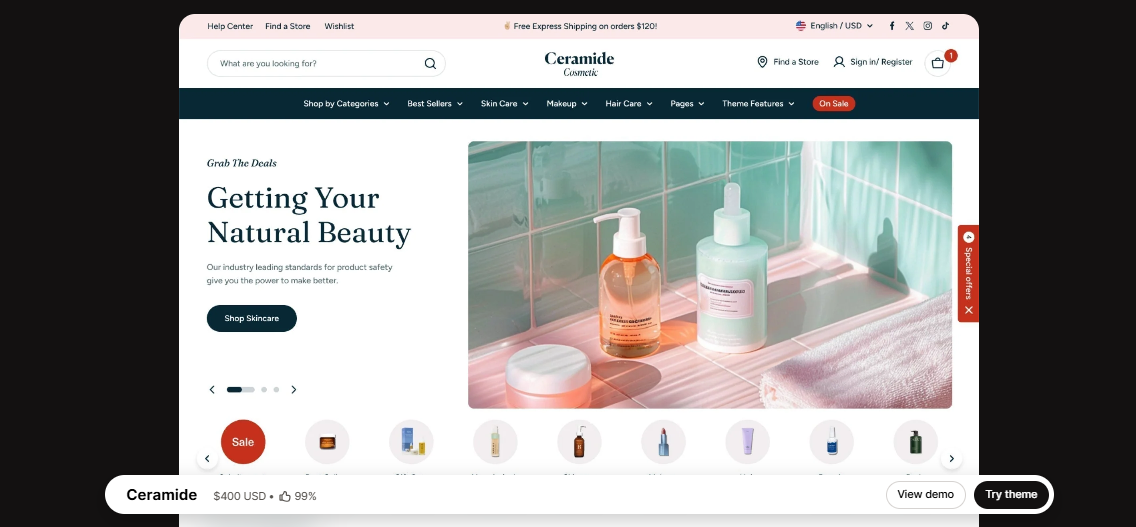
Ceramide Shopify Theme is a modern, stylish, and conversion-focused Shopify theme created for brands that prioritize strong visual presentation and smooth product browsing. Featuring customizable layouts, clear product galleries, and mobile-optimized design, it delivers a professional shopping experience. It works particularly well for skincare brands, beauty shops, wellness products, and lifestyle stores.
If you’ve been around the Shopify ecosystem for a while, you’ve probably heard of Ceramide — it’s one of those themes that quietly keeps gaining attention, especially among brands that care about clean design and high performance. And honestly, there’s a good reason for that. Ceramide isn’t just a Shopify theme; it’s a complete storefront framework that gives you full control over how your online store looks, feels, and converts.
I’ve been using Ceramide on several Shopify projects recently, and it’s quickly become one of my go-to themes for modern eCommerce builds. The first time I tried it was for a skincare brand that wanted something premium-looking but simple to manage. I didn’t want to rely on heavy apps or custom code just to get basic layouts right. Ceramide made everything feel effortless. Its native Shopify editor works directly on the front end, so you can see changes instantly as you build. You can rearrange sections, tweak typography, adjust spacing, and design full pages without touching a single line of code. It’s basically what every Shopify merchant wishes their store setup experience felt like.
What’s great about Ceramide is that it doesn’t box you in. Some Shopify themes feel rigid once you move beyond demos, but Ceramide stays flexible. It works beautifully for beginners, but it also gives advanced users enough control to build fully custom storefronts. Plus, it’s built specifically for high-conversion product stores, so everything — from product pages to checkout flows — feels intentional and optimized.
 Try Theme
Ceramide Shopify Theme Features
Let’s break down what makes Ceramide such a strong and reliable choice for Shopify store owners.
1. Visual Shopify Builder (Online Store 2.0)
The first thing you’ll appreciate is how smooth the editing experience feels. Ceramide works natively with Shopify’s Online Store 2.0 editor, meaning you can drag and drop sections, edit content directly on the page, and instantly preview your changes. I find this especially helpful when optimizing mobile layouts — no switching tabs, no guessing how things will look.
2. Multiple Ready-to-Use Store Designs
If you like starting from a professionally designed layout, Ceramide comes with several beautifully crafted starter demos. You can import one in minutes, replace the content, and launch quickly. For example, when I built a wellness brand store recently, I used one of Ceramide’s minimal product demos, made a few tweaks, and it looked completely custom.
3. Advanced Product Page Layouts
This is where Ceramide really stands out. You get full control over your product pages — image galleries, sticky add-to-cart buttons, product tabs, trust badges, reviews, and upsells — all built directly into the theme. No extra apps needed. It’s perfect whether you’re selling one hero product or managing a large catalog.
4. Complete Store Layout Control
Ceramide isn’t just about pages — it gives you control over your entire storefront structure. You can customize headers, footers, collection templates, product layouts, blog posts, and even promotional landing pages. I once built a brand homepage with sticky announcements, dynamic product highlights, and custom trust sections — all using Ceramide’s built-in layout tools.
5. Dynamic Content Sections
If you’re running multiple collections, product types, or marketing campaigns, you’ll love this. Ceramide lets you reuse sections and dynamically populate content across different pages. That means you can build layouts once and apply them site-wide, saving massive amounts of time.
6. Mobile-Responsive Editing
One of my favorite things about Ceramide is how well it handles mobile design. Every spacing, font size, and layout element can be adjusted for desktop, tablet, and mobile separately. You’re not relying on automatic scaling — you’re actually designing each breakpoint intentionally.
7. Performance Optimized
Let’s be honest — many Shopify themes look good but load slowly. Ceramide is clearly built with performance in mind. It uses lightweight code, avoids unnecessary scripts, and loads only what’s needed. Most Ceramide stores I’ve built score high on Google PageSpeed and GTmetrix without requiring heavy optimization apps.
8. Built-In Marketing & Conversion Tools
Ceramide includes native tools like announcement bars, countdown timers, product badges, upsell blocks, and free shipping indicators. These features integrate naturally into your store design and help improve conversions without relying on third-party apps that slow things down.
9. Global Design Settings
One small feature that makes a big difference: Ceramide lets you define global fonts, colors, buttons, and spacing styles. Change your brand colors once, and your entire store updates instantly. It keeps everything visually consistent and saves a lot of time when redesigning.
10. Ongoing Updates and Support
One of the main reasons Ceramide keeps getting better is the team behind it. They regularly release updates that improve performance, add features, and stay aligned with Shopify’s platform changes. The documentation is clear, and their support team is responsive — which is invaluable when you’re running a live store.
My Experience
I’ve used Ceramide for everything from single-product stores to full brand storefronts, and it’s one of the few Shopify themes I can confidently recommend to almost anyone. Recently, I helped a client launch a premium beauty subscription brand using Ceramide. We built custom product templates, conversion-focused landing pages, and promotional popups — all directly inside Shopify, without external builders or custom code.
Another reason I enjoy using Ceramide is the level of control it gives over small details. Typography, spacing, buttons, animations — everything is adjustable, but never overwhelming. And if you do want to add custom CSS or scripts, Ceramide makes that easy too. It’s the perfect balance between flexibility and simplicity.
Performance-wise, it’s been excellent. Most Ceramide stores I’ve launched load fast, especially after basic image optimization. The theme’s lightweight structure helps avoid the bloat that many multipurpose Shopify themes suffer from.
Download Ceramide Shopify Theme Last Version
We’re sharing Ceramide Shopify Theme here for free for testing purposes only. You can explore its features, try it in your store, and see if it fits your needs. If you like it and want full access with official updates and support, we strongly recommend purchasing it directly from the developer.
Get the official Ceramide Shopify Theme here: Buy Ceramide Shopify Theme
Last Updated on March 18, 2026 by admin