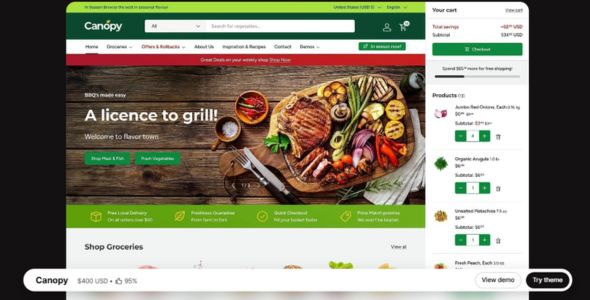
Canopy Shopify Theme is a powerful, feature-rich, and large-catalog-focused Shopify theme by Clean Canvas, designed for bulk selling and stores that need fast product discovery and efficient cart management. With an Amazon-inspired layout, prominent search, optional always-visible cart sidebar, strong mobile performance, and flexible preset styles, it is especially well suited for food and drink, home, jewelry and accessories, clothing, and other inventory-heavy multi-category stores.
If you’ve been around the Shopify ecosystem for a while, you’ve probably heard of Canopy — it’s one of those themes that keeps showing up in successful stores across different niches. And there’s a good reason for that. Canopy isn’t just a theme; it’s a full-featured storefront builder that gives you the power to design and control every part of your online shop. I’ve been using Canopy for several projects over the past year, and honestly, it’s one of those themes that just keeps getting better with time.
When I first tried Canopy, I was building a multi-category store for a client who wanted something clean, fast, and easy to scale. I didn’t want to rely on heavy apps or custom code just to adjust layouts or product pages. Canopy made it simple. Its visual section editor works directly inside Shopify’s theme customizer, so you see your changes instantly. You can move blocks, tweak spacing, adjust colors, and build full landing pages without touching a line of code. It’s basically what every store owner dreams of when they say, “I wish Shopify was easier.”
What’s great about Canopy is that it doesn’t box you in. Some Shopify themes feel rigid, but Canopy gives you real freedom to structure your store exactly how you want. It’s powerful enough for advanced brands but still beginner-friendly. Plus, it’s fully optimized for Shopify’s checkout and performance standards, so you can build a complete online business without needing extra tools. That’s one of the biggest reasons I keep using it for client work — it just works for everything.
 Try Theme
Canopy Shopify Theme Features
Let’s break down what makes Canopy such a reliable and popular choice among Shopify users.
1. Visual Section Builder
The first thing you’ll love is how intuitive Canopy feels. Its drag-and-drop sections let you design pages directly in Shopify’s editor. You can edit text inline, move elements instantly, and preview changes in real time. I find this especially useful when fine-tuning mobile layouts — it saves tons of time.
2. Ready-to-Use Store Designs
If you prefer starting with pre-built layouts, Canopy comes with several professionally designed demos. You can import one in minutes, replace the content, and launch quickly. For example, when I built a home décor store, I used a Canopy demo, made a few tweaks, and it looked completely custom.
3. Shopify Checkout Optimization
This one’s big for conversions. Canopy is fully optimized for Shopify’s checkout flow, cart experience, and payment system. Your product pages and carts are built to convert without needing third-party apps. It works great for both small brands and high-volume stores.
4. Advanced Product Page Layouts
Canopy gives you strong control over your product templates. You can customize galleries, add sticky add-to-cart buttons, use accordion tabs for descriptions and FAQs, and highlight trust badges and reviews. I once built a product storytelling layout with feature sections and social proof — entirely inside Canopy.
5. Dynamic Collection & Product Templates
If you run multiple collections or categories, this feature is gold. Canopy lets you design reusable templates that automatically apply to new products and collections. That means your store scales without you having to redesign pages every time.
6. Responsive Editing
One of my favorite things about Canopy is its mobile optimization. Every layout element adapts beautifully across desktop, tablet, and mobile. You’re not relying on auto-scaling — you’re actually controlling the experience on each device.
7. Performance Optimized
Let’s be honest — many Shopify themes feel heavy. Canopy stays fast. It loads only what’s needed and keeps scripts lightweight. I’ve launched Canopy stores that scored high on Shopify speed tests and Google PageSpeed without aggressive optimization.
8. Built-In Merchandising Tools
Canopy includes smart merchandising features like product filters, promotional banners, featured collections, and announcement bars — all built into the theme. I’ve used these to boost product discovery and improve navigation without installing extra apps.
9. Global Styling Controls
Small feature, big impact: Canopy lets you define global fonts, colors, and button styles. Change them once, and your entire store updates instantly. It keeps everything consistent and saves massive amounts of time.
10. Ongoing Updates and Support
Canopy is actively maintained and regularly updated to stay aligned with Shopify’s latest features and performance standards. The documentation is solid, and support responses are fast — which matters a lot when your store revenue depends on stability.
My Experience
I’ve used Canopy for everything from niche one-product stores to large multi-category catalogs, and it’s one of the Shopify themes I consistently recommend. Recently, I helped launch a wellness brand using Canopy. We built custom product layouts, campaign landing pages, and mobile-first homepage sections — all inside the theme editor. No page builders, no heavy apps, no custom code.
Another reason I enjoy working with Canopy is the level of control it gives over small design details. You can fine-tune spacing, typography, buttons, and animations without touching CSS. And if you do want to add custom code, Canopy makes that simple too. It’s a perfect mix of flexibility and ease of use.
Performance-wise, I’ve consistently seen fast load times, especially after basic image optimization. Canopy’s lightweight structure avoids the bloat that many Shopify themes struggle with.
Download Canopy Shopify Theme Last Version
We’re sharing Canopy Shopify Theme here for free for testing purposes only. You can explore its features, try it on your store, and see if it fits your needs. If you love it and want official updates and support, we strongly recommend purchasing it directly from the developer.
👉 Get the official Canopy Shopify Theme here: Buy Canopy Shopify Theme
Last Updated on March 17, 2026 by admin