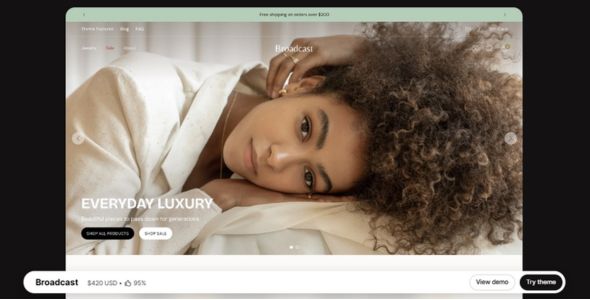
Broadcast Shopify Theme is a powerful, feature-rich, and sales-driven Shopify theme designed for growing ecommerce brands that want strong promotions and polished shopping experiences. With 30+ customizable sections, upsell tools, one-click add-to-cart, and mobile-first performance, it is especially well suited for fashion, beauty, accessories, lifestyle, and home brands.
If you’ve been working with Shopify for a while, you’ve probably heard of Broadcast — it’s one of those themes that keeps showing up in bold, content-rich stores that really know how to tell a story. And there’s a good reason for that. Broadcast isn’t just a Shopify theme; it’s a powerful, media-focused storefront built for brands that rely heavily on visuals, storytelling, and strong brand identity.
I’ve been using Broadcast for several Shopify projects over the past few years, especially for brands that wanted more than just a simple product catalog. And honestly, it’s one of those themes that grows on you the more you use it. It’s creative, flexible, and clearly designed for brands that want to communicate—not just sell.
The first time I used Broadcast was for a lifestyle brand that wanted their Shopify store to feel more like a magazine than a traditional online shop. They had strong photography, long-form content, and a clear brand message. Broadcast made it easy to bring all of that together. We were able to create a visually rich store that felt immersive and premium without relying on custom development.
What really makes Broadcast stand out is its focus on content and storytelling. While many themes prioritize speed and simplicity, Broadcast gives you the tools to build depth and emotion into your storefront. It’s ideal for brands that want customers to connect with their story, not just click “Add to Cart.”
 Try Theme
Broadcast Shopify Theme Features
Let’s break down what makes Broadcast such a popular choice among storytelling-driven Shopify brands.
1. Bold, Content-First Design
The first thing you’ll notice about Broadcast is its bold, editorial-style design. The layouts are built to showcase large images, rich content, and strong typography. Everything feels spacious and intentional, giving your brand room to breathe.
I’ve found this especially effective for lifestyle, fashion, wellness, and creative brands.
2. Shopify Section-Based Builder
Broadcast is built using Shopify’s native section editor, so you can customize your store visually and see changes instantly. You can rearrange sections, edit content, and experiment with layouts without touching code.
This makes it easy to build custom-looking pages while keeping the backend simple.
3. Flexible Homepage Layouts
The homepage layouts in Broadcast are designed to guide visitors through your brand story. You can mix editorial sections, featured products, collections, and storytelling blocks without the page feeling cluttered.
For one project, I built a homepage that flowed like a digital magazine—hero imagery, brand story, featured products, and editorial content—and it worked beautifully.
4. Story-Driven Product Pages
Product pages in Broadcast are designed to do more than just sell. They give you space to explain, educate, and inspire. You can combine large visuals, detailed descriptions, and supporting content in a way that feels natural.
This works especially well for brands with unique products or strong brand values.
5. Built for Visual Brands
Broadcast is ideal for brands that rely heavily on photography and video. The theme handles media beautifully, allowing you to create immersive sections that draw users in.
If your brand has strong visuals, Broadcast helps you make the most of them.
6. Fully Responsive Design
Every layout in Broadcast is fully responsive and optimized for mobile devices. The mobile experience feels just as intentional as the desktop version, which is crucial given how much Shopify traffic comes from mobile.
You don’t need to rebuild or simplify your content for smaller screens—it adapts smoothly.
7. Performance Optimized
Despite its rich visuals and content-heavy layouts, Broadcast is well-optimized for performance. Pages load quickly, and the theme avoids unnecessary bloat when features aren’t in use.
With proper image optimization, it’s easy to achieve solid performance scores.
8. Shopify Online Store 2.0 Ready
Broadcast fully supports Shopify Online Store 2.0, giving you more flexibility when creating custom templates for products, collections, and pages. This makes the theme future-proof and easier to scale as your store grows.
9. Branding & Typography Control
Broadcast gives you strong control over fonts, colors, and overall styling. You can define your brand identity once and apply it consistently across the entire store.
This is especially important for brands with a strong visual voice.
10. Regular Updates & Support
The theme is actively maintained with regular updates to improve features, performance, and compatibility with Shopify’s latest changes. Documentation is clear, and support is available when you need it.
That reliability makes Broadcast a safe long-term choice.
My Experience
I’ve used Broadcast for several Shopify projects, particularly for brands focused on storytelling and content marketing. One recent project involved a wellness brand with long-form content, rich photography, and educational sections. Broadcast handled it effortlessly.
What I appreciate most is how much freedom the theme gives you creatively. You can build layered, immersive layouts without custom code. And if you do want to add custom CSS or scripts, Broadcast supports that as well.
Performance has been consistently solid. Even content-heavy pages feel smooth and responsive across devices.
Download Broadcast Shopify Theme Last Version
We’re sharing the Broadcast Shopify Theme here for testing purposes only. You can explore its features, experiment with layouts, and see whether it fits your brand’s needs.
If you plan to use it for a live store, we strongly recommend purchasing the official version directly from the developer to get full access, updates, and support.
Get the official Broadcast Shopify Theme here: Buy Broadcast Shopify Theme
Last Updated on March 10, 2026 by admin